


Updated August 2026
A visual case study…
Marriott: 73 Metrics, 4 Dashboards
In 2015, Marriott International’s Asia-Pacific revenue teams pulled numbers from five separate enterprise systems to answer daily pricing questions. Over five weeks, I consolidated 73 data fields into four Tableau dashboards — one for each person with a decision to make. Here is how the project ran.
The project in one paragraph
What did the Datalabs Agency build for Marriott?
Between 2015 and 2016, the Datalabs Agency designed four production Tableau dashboards for Marriott International’s Asia-Pacific operations, consolidating 73 data fields from five enterprise systems into screens for General Managers, revenue managers, F&B managers, and sales teams — alongside a dashboard design style guide and training materials.
The Datalabs Agency is a Melbourne-based data visualization consultancy founded in 2012 that delivers corporate training workshops (Power BI, Tableau, data storytelling), dashboard design, and BI style guides for clients including Mercedes-Benz, Adidas, and UPS.
Watch the data find its screen
From five systems to four screens
Every metric a manager needs starts in one of five systems on the left and ends on one of four screens on the right.
The problem behind the brief
Why did Marriott need new dashboards?
The animation above is the finished story. Before it, Marriott’s APAC revenue managers were spending hours every week manually compiling reports from 73 data fields spread across those five systems — MARSHA (reservations), Smith Travel Research (competitive intelligence), PeopleSoft (financials), Sales Force One (corporate accounts), and GRMRS (revenue management). Basic questions took a compilation exercise to answer.
The questions themselves were simple ones: how is the property tracking against its competitive set this week, and should we discount rooms for the coming weekend? The data existed — the delay was in assembling it. APAC analytics leadership set a brief with a higher bar than reporting: they wanted dashboards that drove action, screens a manager would open on a Tuesday morning and price a room from. That brief shaped everything that follows on this page, from who was in the discovery workshops to why the final count was four dashboards, not one giant one.
Hong Kong, on site, with the users
How did the discovery workshops run?
I ran intensive discovery workshops on site in Hong Kong with the people who would actually use the system: revenue managers, General Managers, regional analytics teams, and executive leadership. From those sessions, four distinct decision-making contexts emerged — and each one became a dashboard.
The guiding principle: people are the ones who take action, so people come first in dashboard design. Insights come out of data, and they come out of the people working with it. It is the same co-design method I now teach in our team training workshops — the workshop is where you learn which numbers a decision actually turns on.
One screen per decision-maker
The four Marriott dashboards
Each dashboard was built around one user and the decisions that user makes.
| Dashboard | Built for | Decisions it supports |
|---|---|---|
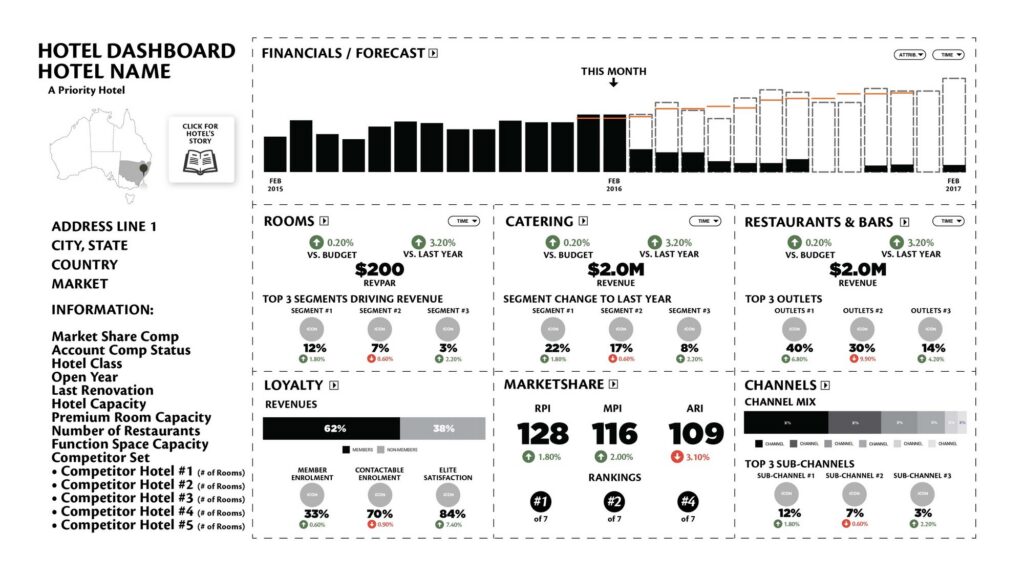
| Hotel | General Managers | Daily operational calls; position within the competitive set |
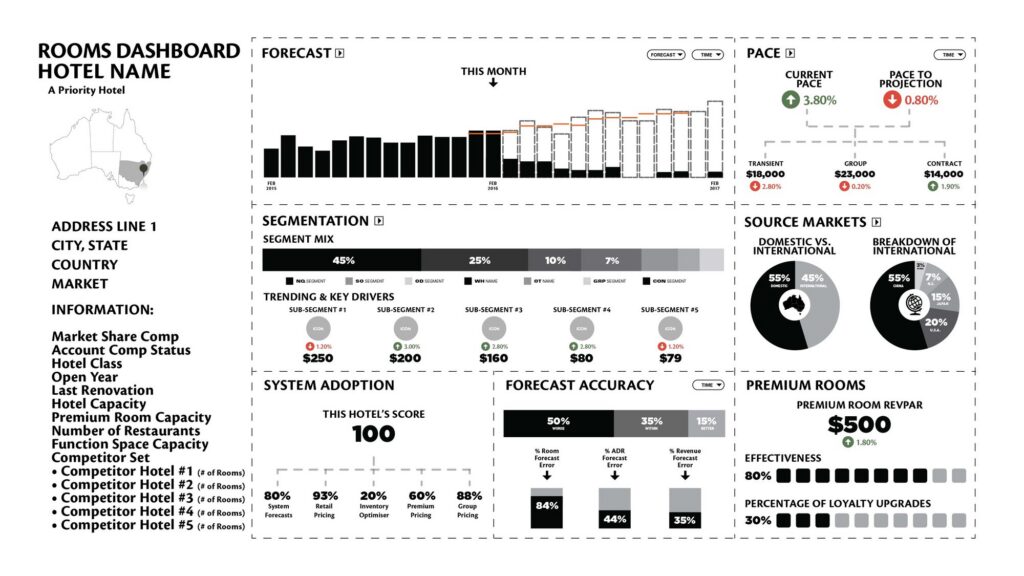
| Rooms | Revenue managers | Pricing and inventory; pace against projection |
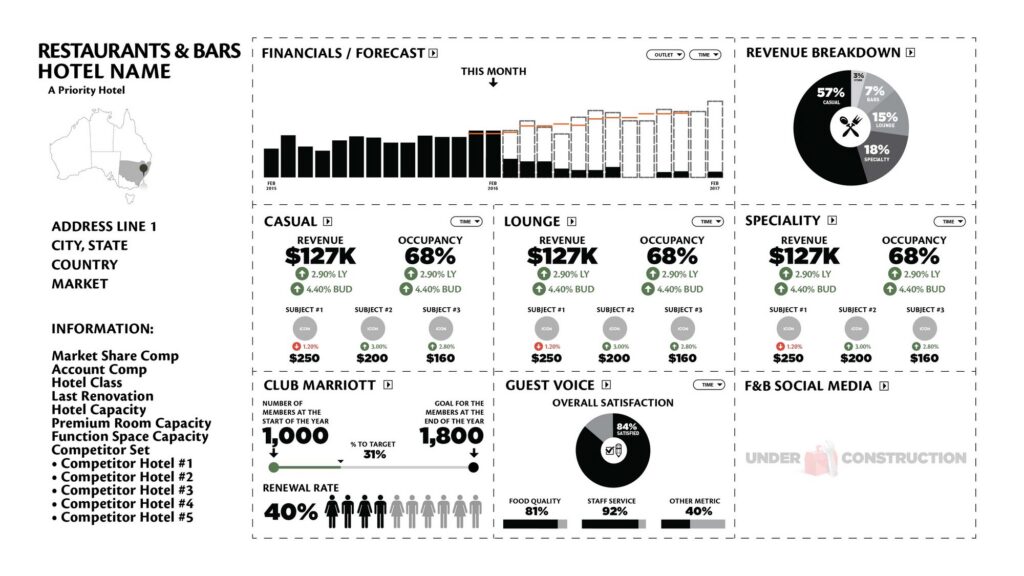
| Restaurants & Bars | F&B managers | Outlet performance; membership and satisfaction tracking |
| Catering | Sales teams | Group bookings and events |
All four were delivered as complete Tableau dashboard designs, integrating data from five enterprise systems.
The design work, full size
Every dashboard, up close
Click any design to view it full-screen — these are the design files, indicative figures included.
For General Managers
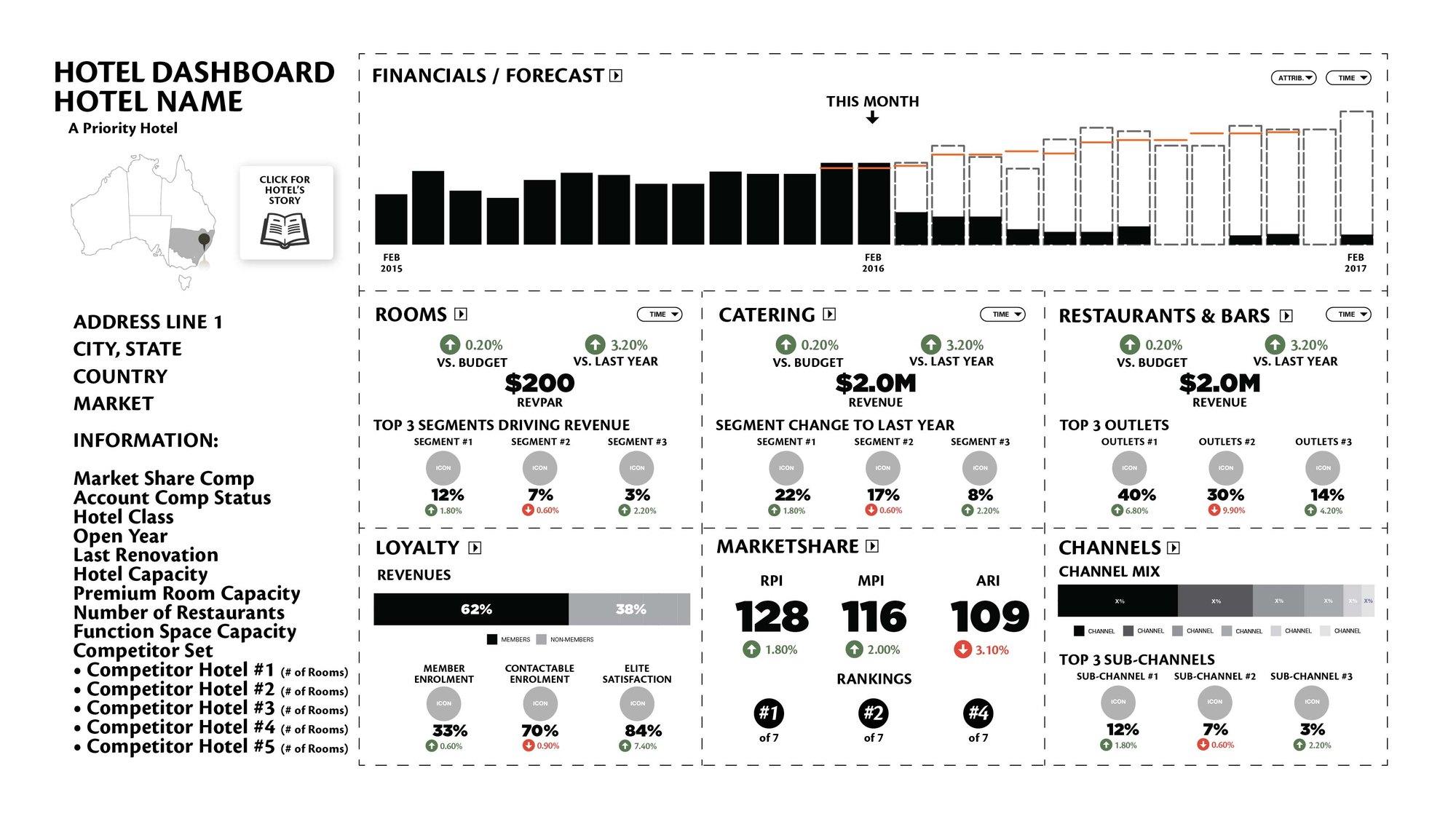
Hotel
For revenue managers
Rooms
For F&B managers
Restaurants & Bars
For sales teams
Group & Catering
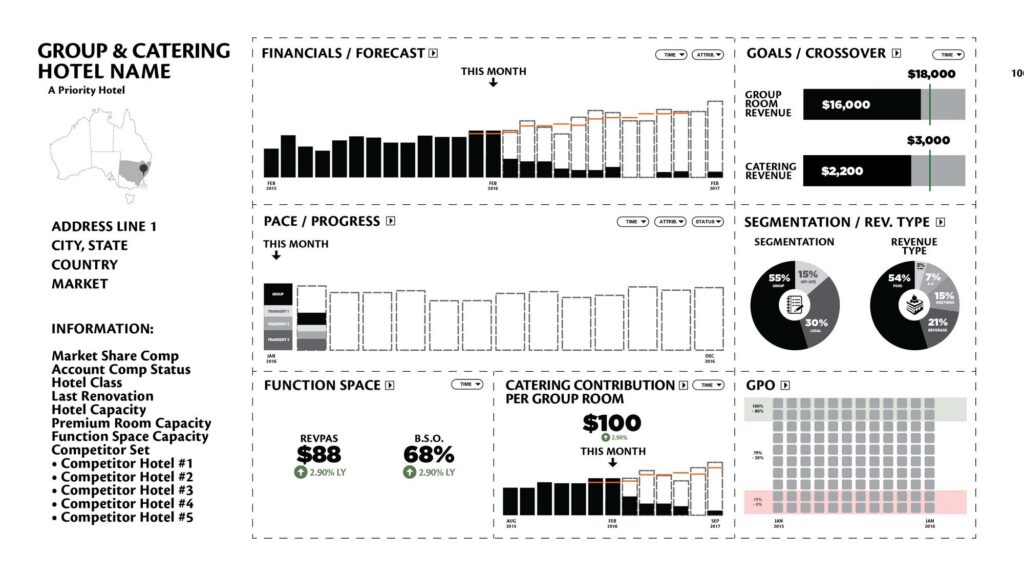
Click the markers
Read the Hotel Dashboard like a GM
Five markers explain what each region of the screen does for the person who opens it every morning. Figures are illustrative design values.
How it all connects
One dashboard system, six tiers deep
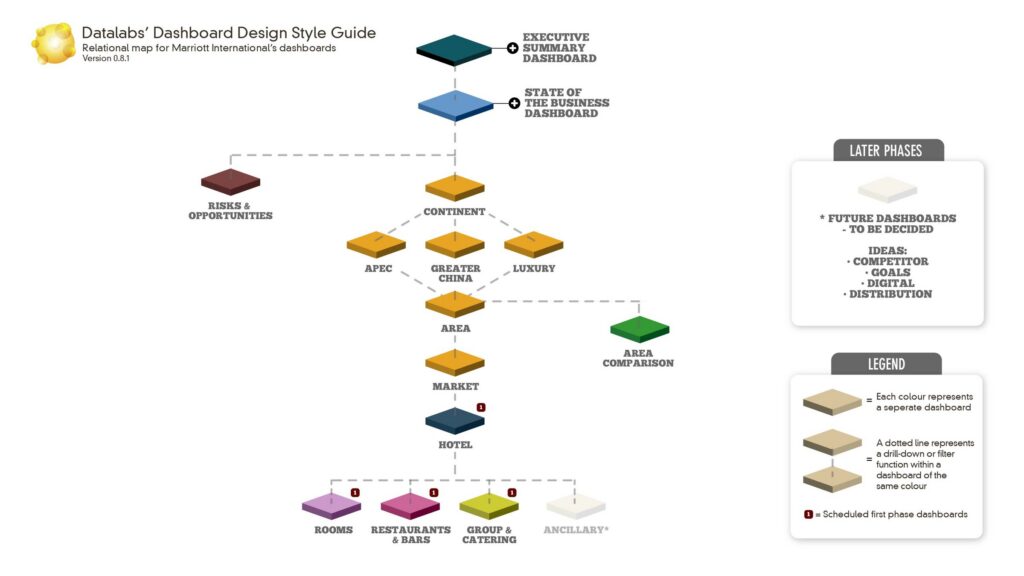
The four screens are not four separate projects — they are one system. This relational map is a Datalabs planning artifact — we draw one at the start of every dashboard program so the whole system can be seen on one page. Here it shows how an executive summary rolls down through continent, area, market, and hotel to the four operational dashboards, supporting a six-tier organisational hierarchy with drill-down and filtering at every level.
The rules under every screen
The design concepts behind the screens
Six principles from the project’s dashboard design style guide shaped every screen — and the guide itself became a deliverable.
Delivered, documented, taught
What did Marriott receive at the end?
Marriott received four production Tableau dashboards, a dashboard design style guide, and training materials for the teams who would live in the screens. The work was presented to Marriott’s senior marketing and sales leadership.
The style guide and training are the part that keeps paying after the consultant leaves. A dashboard is one artefact; a documented design language plus a trained team is the ability to make the next twenty artefacts in-house. That capability-building layer has been part of every Datalabs Agency dashboard project since.
People are the only ones who take action — so people, not data, have to be the priority in dashboard design.

Otto Ottinger
The design principle behind the Marriott project
Questions & Answers
The Marriott project
People first, pixels second
Why the workshops came before the wireframes
I did not open Tableau in week one. I got on a plane to Hong Kong and sat in rooms with the people the dashboards were for — revenue managers, General Managers, regional analytics teams, and the executives they report to. Every hour of those workshops saved days of redesign later.
The workshops did one job: they surfaced how decisions actually get made. A General Manager checks the property’s position in its competitive set before the morning stand-up. A revenue manager decides whether to discount a weekend based on pace against projection. Those are different decisions on different rhythms, and no single screen serves both well.
That is why the number four matters. Four dashboards was not a design flourish — it was the number of distinct decision-making contexts the workshops uncovered. Each screen answers one person’s questions completely, and nobody scrolls past someone else’s numbers to find their own.
I run the same discovery method today, in client projects and in our data visualisation training workshops. If you take one thing from this case study, take the sequence: workshops, then wireframes. The data model can wait a fortnight; the people cannot be skipped.


Where the style guides began…
What Marriott taught me about design systems
Consulting with Marriott Hotels in Hong Kong in the early days of the BI revolution, I saw the problem that would shape the next decade of my work: dashboards were being created without a design philosophy, without a common design language, and without proper attention to colour theory, typography, grid systems, and user experience design.
Four dashboards for one region of one hotel group already needed consistency — shared colour logic, shared chart conventions, shared naming. Scale that to a global company and the need becomes a document. That is why the Marriott engagement shipped with a dashboard design style guide, and why the deliverable list included training materials for the teams who would inherit the system.
That insight became a core Datalabs Agency service. My data visualization style guides now operate inside companies such as Mercedes-Benz in Germany and other global financial and technology firms — each one doing for a whole organisation what the Marriott guide did for one region.
The through-line from 2015 to now is the same: a dashboard is a product, and products need design systems. If your organisation is accumulating dashboards faster than it is accumulating design decisions, our dashboard design services page shows how we run that engagement today.
The Data Design Firm for AI & Visualization
The Datalabs Agency
Templates, guides, grids, icons…
Creative Design Assets »
Learn visualization and storytelling skills…
« Beautiful Courses in Data Design
Some of the notable brands Otto has worked with…
Otto Ottinger’s Clients of Note








Professional & Thought-provoking
Looking for a speaker for your event?
"*" indicates required fields